


Wireless CarPlay Andorid Auto Navigation For BMW X3 F25 X4 F26 2018-2021 EVO
Wireless CarPlay Andorid Auto Navigation For BMW X3 F25 X4 F26 2018-2021 EVO
Couldn't load pickup availability
Transform your drive with this 10.25” HD Android Infotainment System. Combining a high-speed 8-core processor with seamless smartphone integration, it’s the ultimate tech upgrade for a modern, connected cockpit.
Key Features:
-
-
High-Speed Performance: 2.0GHz 8-core CPU with up to 6GB RAM for lag-free multitasking.
-
10.25” HD Touchscreen: Vibrant display featuring Split-Screen mode and crystal-clear visuals.
-
Seamless Connectivity: Built-in CarPlay, Android Auto, 4G LTE, and Wi-Fi.
-
Pro Audio & Navigation: Integrated GPS, Bluetooth, and a powerful 4×45W audio output.
-
Full OEM Control: Retains original Steering Wheel Controls for a factory-safe experience.
-
Expandable Storage: Up to 256GB internal capacity with additional TF/Micro SD support.
-
Warm and important tips:
1). The device must search for satellites successfully the first time and then update the time,
2). Please understand that system and pre-installed applications will take up some memory; if you install the Russia map, it will take up about 3 GB; if you install the map of Europe, the system will take up about 7 GB;
3). This is the cable location diagram:

1. What should I do if my original car system is not displayed?
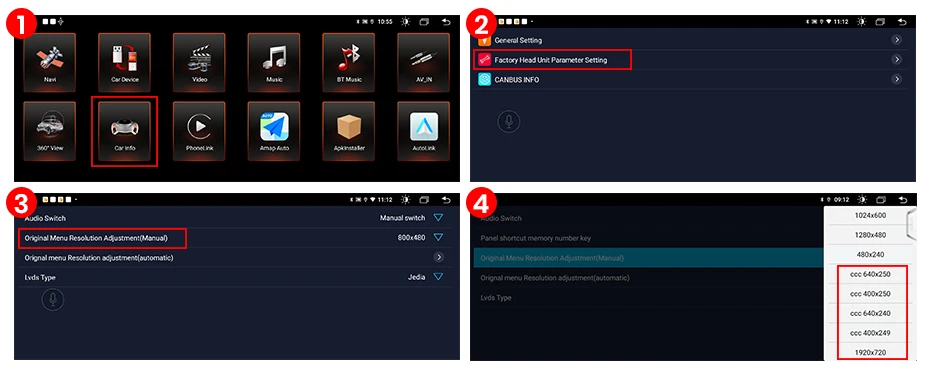
Please enter "Model Information" -- "Factory Main Unit Parameter Setting" --- "Original Menu Resolution Setting (Auto)", "Success" will appear, please click "Confirm" " and restart.
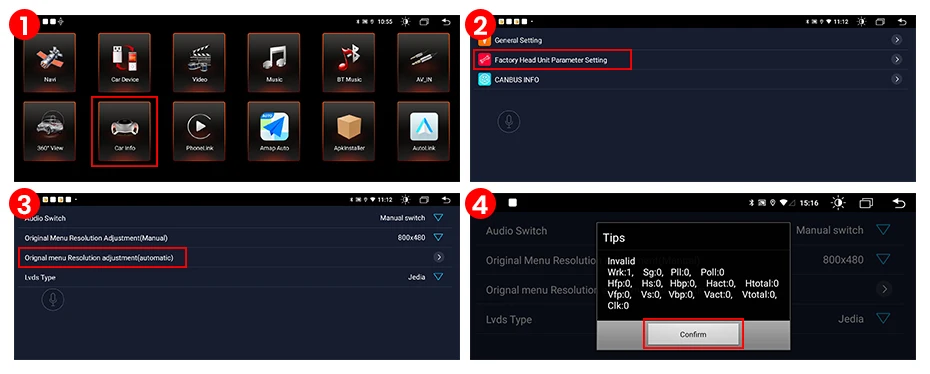
PS: If your car has CCC system, please click the CCC resolution.
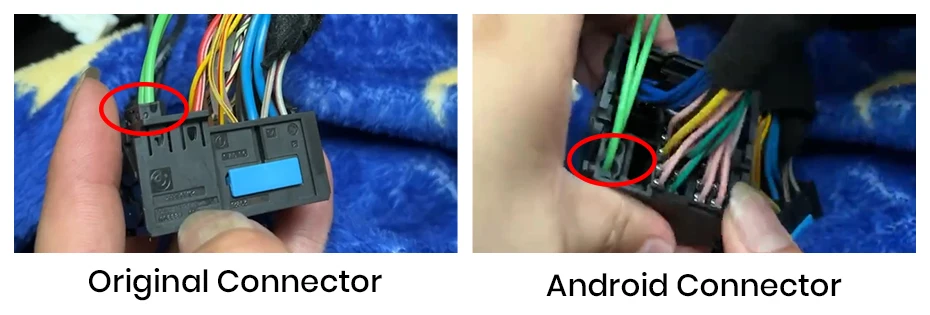
2. No sound in Android system?
Please make sure the original optical cable is properly connected to the car Android power line.
3. Is my iDrive compatible?
iDrive function is reserved, it can still control your original car system and also can control the application program of the first interface of Android system.
4. How to connect the rear camera?
Please connect the red cable of the camera to the brown cable, and the yellow port of the camera to the yellow port. Please do not connect the reverse light wire.
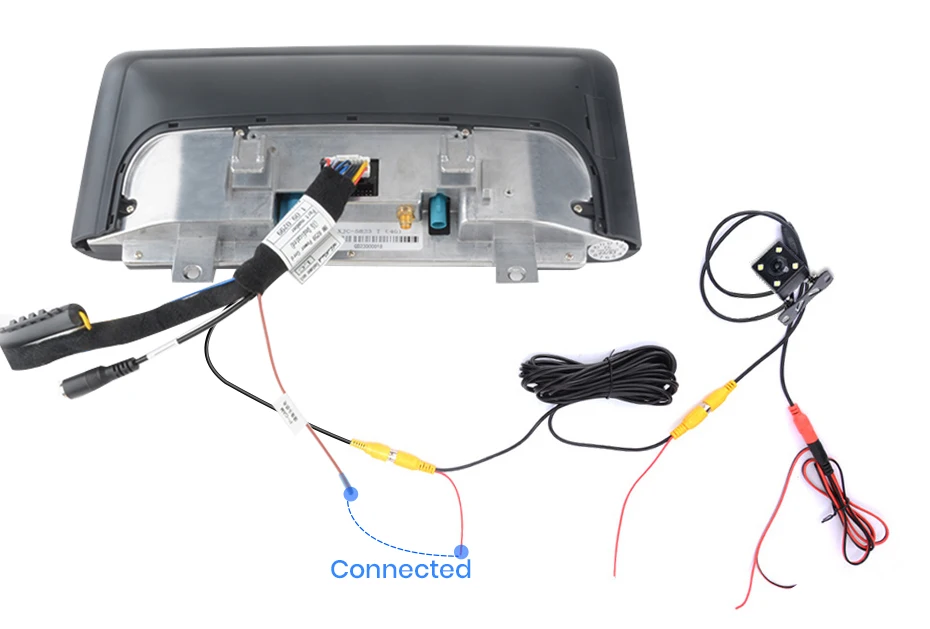
Get it between - and -.


Touchscreen Display
Our Car Navigations feature touchscreen Diplays

Bluetooth 5.0
Enjoy Hands-free connectivity

Wireless Carplay
Enjoy Wireless Android Auto and Apple CarPlay

Tested
All our products are tested through specific and rigorous checklists before being put to sell, buy stress free

No battery drainage
Our products do not drain the battery life of your car

Plug & Play
No codding needed. The majority of our products have been developed with one word in mind: OEM. This makes our products easy to install and factory spec.

Integrated Apple Carplay
All our navigations come with Apple Carplay and Android Auto. Experience the future and what should be the standard for today's vehicles. Seamlessly integrate your smartphone with your vehicles infotainment system for hassle-free navigation, app access and communication.