


CarPlay Android Auto Car Navigation For BMW 3-Series E90 E91 E92 E93
CarPlay Android Auto Car Navigation For BMW 3-Series E90 E91 E92 E93
Couldn't load pickup availability
Upgrade your BMW 3 Series with the XT89 Android Infotainment System. Powered by an elite 8-core processor (up to 2.7GHz), this double-din unit delivers a cinematic experience with resolutions up to 2000*1200P and full smartphone integration.
Key Features:
-
Ultra-HD Touchscreen: Available in sizes up to 11.5" with Split-Screen and 2K resolution.
-
Pro Performance: Up to 6GB RAM and 256GB storage for seamless app handling.
-
Total Connectivity: Built-in 4G LTE, Wi-Fi, Wireless CarPlay, and Android Auto.
-
Smart Tracking & Navigation: Precision GPS with OTA updates and mobile tracking support.
-
Premium Audio: Integrated DSP with 4*45W output and Bluetooth 5.0 (OBD2/Hands-free).
-
Guaranteed Quality: 3-year warranty with lifetime firmware updates.
Supported Models:
-
BMW 3 Series E90 / E91 / E92 / E93 (2005 Onwards)
⚠️ Important Fitment Note: > * After installation, the unit will protrude approximately 1 cm from the center console.
Compatibility: This unit is not compatible with models featuring a specific row of buttons on the lower center console frame. Please verify your dash layout before purchasing.
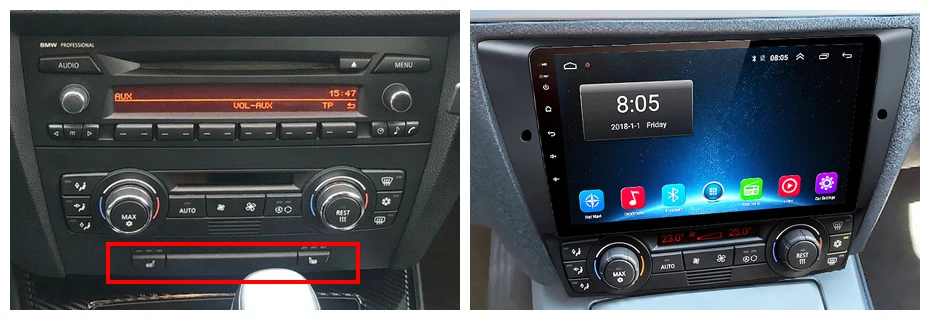
Installation & Troubleshooting Guide
Need help getting your new system up and running? Follow these simple steps for a seamless setup.
1. Rear-View Camera Wiring
To ensure your camera triggers automatically when you shift into reverse:
-
Red Cable (②): Connect to the backup light Positive (+) terminal.
-
Black Cable (①): Connect to the GND (Ground).
-
Reversing Detection (④ - Brown): Connect to the Red Cable (③) extending from the video input cable.
2. Setting Up Steering Wheel Controls (SWC)
If your controls aren't responding, check your Canbus status:
-
If you HAVE a Canbus: Ensure the 8-pin interface is plugged in. Go to settings and select your specific Canbus model (contact support if unsure).
-
If you DO NOT have a Canbus:
-
PX1/PX2/PX4/PX9: Go to Car Settings > General > SWC Type > Learning Type.
-
PX2 (Alternative): Go to Settings > Car Information > SWC > Learning Type.
-
3. Wireless CarPlay & Android Auto
-
Pair Bluetooth: Turn on your phone's Bluetooth and pair it with the car radio.
-
Launch App: Once paired, the radio will open Zlink or AutoLink.
-
Confirm: Accept the "Use CarPlay/Android Auto" prompt on your phone.
-
WiFi: Ensure your phone's WiFi is ON (the system uses this for the data connection).
4. Wired CarPlay & Android Auto
-
The Cable: Use your phone’s original data cable (third-party cables often fail).
-
The Port: Connect to the 4-pin USB cable on the back of the device.
-
The App: Tap the ZLINK5 or AutoLink icon on the screen to initiate.
5. Changing the Boot Logo
Due to copyright regulations, vehicle logos are not pre-installed.
Tip: If you wish to customize your startup screen with a specific logo, please reach out to Customer Service for the required software update and modification steps
Get it between - and -.


Touchscreen Display
Our Car Navigations feature touchscreen Diplays

Bluetooth 5.0
Enjoy Hands-free connectivity

Wireless Carplay
Enjoy Wireless Android Auto and Apple CarPlay

Tested
All our products are tested through specific and rigorous checklists before being put to sell, buy stress free

No battery drainage
Our products do not drain the battery life of your car

Plug & Play
No codding needed. The majority of our products have been developed with one word in mind: OEM. This makes our products easy to install and factory spec.

Integrated Apple Carplay
All our navigations come with Apple Carplay and Android Auto. Experience the future and what should be the standard for today's vehicles. Seamlessly integrate your smartphone with your vehicles infotainment system for hassle-free navigation, app access and communication.